Wix booking apps for classes, passes and courses
Use Wix Bookings for classes paid through Wix. Use Junocal’s Wix app when members already keep their credits in Junocal.
Where should the booking live?
| Studio requirement |  Wix Bookings |  Junocal on Wix |
|---|---|---|
| Booking record | Wix Bookings calendar | Junocal timetable and roster |
| Classes and privates | Wix services | Junocal widget in Wix |
| Package decision | Classes and appointments only | Sell courses separately; Studio for mixed allowances |
| Subscription | Eligible Wix plan for online payments | New Wix accounts billed through Wix |
Swipe across to compare platforms.
Choose the calendar your receptionist will open on Monday. In Wix Bookings, build services in the Wix dashboard. With Junocal, publish the timetable once in Junocal and display it through the Wix app. Keeping both systems open for the same class makes it possible to sell one place twice. Wix booking and payment options · Junocal’s Wix setup and billing.
What records do a drop-in, a class pack and a six-week course create?
The $22 drop-in created one paid class reservation. The $75 pack issued five visits and reserved no class. The $120 course created one paid enrollment for a series of six Saturdays. For a receptionist finding a missing customer, the product on the receipt tells them where to look.
| Product sold | What the customer received | Where the owner looks in Junocal |
|---|---|---|
| $22 Adult Contemporary | Order confirmation for December 2. | Class roster. One confirmed booking with $22 paid. |
| $75 Five Mat Classes | Order confirmation for the pass. | Customer’s packs. Five visits remaining and zero class reservations. |
| $120 Dance Foundations | Enrollment confirmation for December 5 through January 9. | Course enrollment list. One participant with $120 paid across the six-date series. |
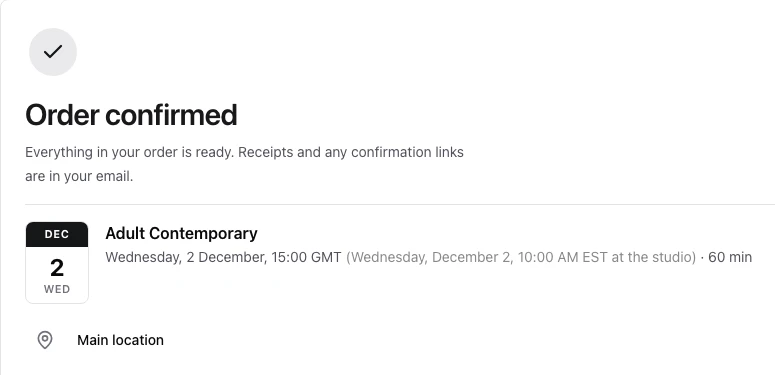
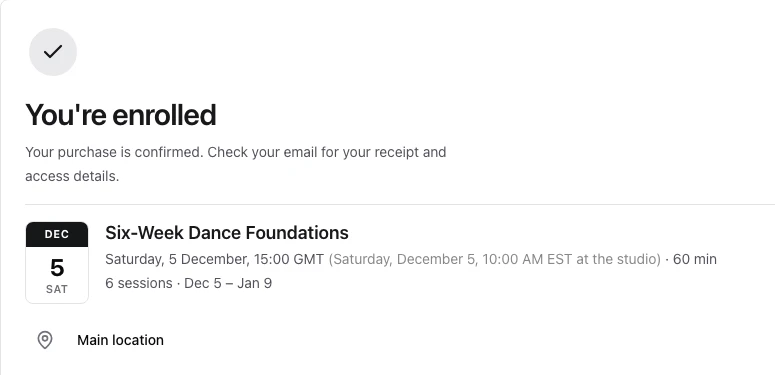
On November 27, 2026, we opened Ballet Basics from the timetable on a published Wix test site and reached the booking and pack options. For the paid tests we ran Junocal’s Wix booking element on a local host with an isolated studio and Stripe test cards. We matched each on-screen confirmation to the studio records. The screenshots show the customer’s on-screen confirmations. We did not test email delivery.
With native Wix Bookings, staff open the course in Booking Calendar to manage the participant list. Wix documents that removing a participant cancels their entire course booking. A Wix receipt can be issued manually or automatically when configured. Wix course roster instructions · Wix receipt settings · Follow a paid pass through a booking and cancellation.
Can a Wix membership pay for a six-week course?
Wix documents memberships and packages for appointments and classes, and specifically excludes courses. That distinction matters for a ceramics term, a beginner pole course or a six-week dance series. A weekly drop-in sells a date. A course sells enrollment in the series. Decide which promise the customer is buying before you configure the service. Wix membership and package eligibility.
If a studio closure moves week three, ask the vendor to reschedule that meeting while the same participant keeps the remaining dates. Have the receptionist open the amended calendar and the customer open their course confirmation. Our six-date purchase covers initial enrollment. A school promising makeups should test its own change policy before publishing the term.
Install the Junocal app and publish a timetable
- Open the Junocal listing in the Wix App Market, choose Add to Site and select the correct site. Existing Junocal owners can connect their current studio. New studios starting in Wix follow Wix billing.
- In the Wix Editor, place the Junocal booking widget on the page customers use. Choose the schedule, packs, courses or full booking view. Publish the site after placing it.
- Change one class time in Junocal. Check the published Wix page from a signed-out phone, then follow the class through to the booking screen. Verify the teacher, local time, availability and checkout destination.
The app documentation lists a 14-day trial for new studios and US monthly prices of $15 Starter, $29 Studio and $69 Growth. The studio connects its own Stripe account for customer payments. Existing Junocal accounts keep their billing arrangement. Open the Wix App Market listing · Widget settings and current terms.
What if the studio needs a custom timetable on Wix?
The Wix app places Junocal booking in the editor and handles the Wix account connection. A studio adding an existing Junocal timetable can also paste its booking embed into a Wix Embed HTML element. Publish and follow a class link on a phone: Wix puts this element inside a frame, so checkout opens in a new tab. Embedding in a website frame.
If the site’s developer needs to control the layout of each class listing, use Junocal’s read-only JSON schedule API on Studio or Growth. Keep each listing linked to its own Junocal booking URL. Compare the app, widget, schedule API and webhooks.
Move one class without losing a paid booking
Choose a full Tuesday class. Record capacity, attendees, future reservations, remaining customer credits and the next recurring charge. Recreate it in the receiving system with online sales closed. Match one paid member and one drop-in against their original receipts. Then close the old booking route and open the new one. Check every Wix menu link and mobile button that said “Book”.
Keep an existing monthly member’s next charge date in view throughout. A working widget proves the page can display a class. Their next receipt and remaining visits establish that the migration preserved what they bought. Use the renewal and prepaid-reservation cutover example.