WordPress booking plugins for studio classes
Use Junocal for class packs, Amelia for appointment packages, or WooCommerce Bookings for reservations in your store cart.
Which plugin fits your checkout?
| Studio requirement |  Junocal |  Amelia |  WooCommerce |
|---|---|---|---|
| Where bookings live | Junocal studio account | WordPress admin | WooCommerce orders |
| What you sell | Timetable, packs and memberships | Appointments or events | Bookable products and resources |
| What to price | Free plugin + studio subscription | Pro or Elite for service packages | Bookings extension + store costs |
Swipe across to compare platforms.
A yoga owner selling five visits needs a remaining balance after each class. A photographer renting the same studio on Sundays needs the room taken off sale for a block of time. Both can use a WordPress booking page. They need different records behind it. Junocal publishes this guide and supplies the first plugin. WordPress.org listing · Amelia package rules · WooCommerce Bookings.
What happens to a five-class WordPress pass after booking and cancellation?
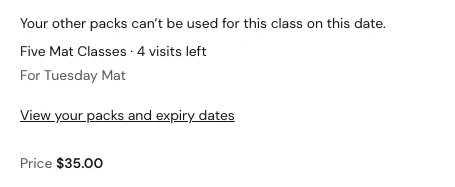
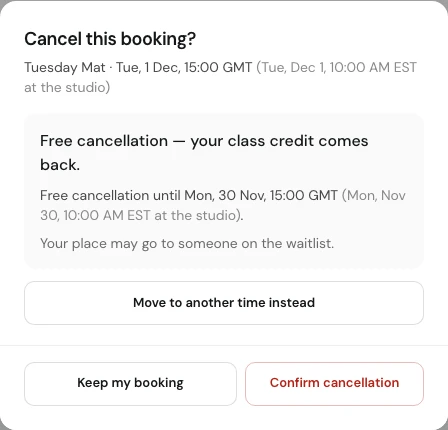
Five visits became four after one mat booking. An excluded $35 workshop left the four intact. Cancelling the mat booking before the deadline restored the balance to five. On November 27, 2026, we paid $75 in Stripe test mode on a clean WordPress 7.1.5 site running Junocal Booking 1.0.4. These were the prices we set for this studio.
| Customer action | Studio’s record | Cash and visits |
|---|---|---|
| Buy Five Mat Classes on the WordPress page | One completed pass order. No date reserved. | $75 paid · 5 visits |
| Book Tuesday Mat using the pass | One confirmed reservation against the pass. | $0 extra · 4 visits |
| Open Friday Workshop | Checkout explained the pass covered Tuesday Mat and offered the workshop at $35. We stopped before payment. | $0 extra · 4 visits |
| Cancel Tuesday before its 24-hour cutoff | The reservation changed to cancelled and the credit returned to the same pass. | $0 extra · 5 visits |
Set up a five-class pass for your WordPress studio. After creating the studio, add Tuesday Mat to the schedule, open Packs and create five visits for $75 valid for 60 days. Limit eligibility to Tuesday Mat. If you already use Junocal, open the pack editor. Then install the plugin and add the booking block.
We installed the release from WordPress.org, pointed its widget at an isolated US Junocal Studio account and enabled embedded payment for that account. We bought the pass through the plugin, then redeemed and cancelled it on Junocal’s signed-in customer pages. We checked the resulting pass and booking records. A studio using hosted checkout can open the secure payment step in a new tab. Plugin version and installation · See which reformer and private bookings a mixed membership covers.
Put a live class schedule on WordPress
- Install and activate Junocal Booking from Plugins → Add New. Under Settings → Junocal Booking, paste the public booking-page URL for your studio.
- Add the Junocal Booking block to a page and select Schedule. In the classic editor or an Elementor Shortcode widget, use
[junocal view="schedule"]. - Publish and open the page signed out on a phone. Pick a dated class, follow registration to the Junocal booking page and check the selected studio and time before checkout.
We downloaded version 1.0.4 from WordPress.org on November 27. The released ZIP registers the junocal/booking block and the junocal shortcode. The directory lists WordPress 6.3 as the minimum. WordPress.com sites need a plan that permits plugin installation. The free plugin connects to a separate Junocal account. US paid plans start at $15 monthly after the trial. Install from WordPress.org · Junocal’s illustrated setup · US studio plans.
Can I use WordPress without installing a booking plugin?
Yes. In Junocal, open Booking page → Embed. Paste the booking widget into a WordPress Custom HTML block or an Elementor HTML widget. Choose the full booking page, the class schedule or one product type. A Book online button works as a plain link if the site cannot run scripts. Both are on every Junocal plan. WordPress embed instructions.
For a timetable styled entirely in your theme, Studio and Growth include the read-only JSON class schedule API. Each class has a name, start time, end time and booking link. Use the supplied studio timezone and send visitors to the individual class. Set up the schedule API.
When do Amelia and WooCommerce make more sense?
Amelia suits an owner who wants reception working in WordPress. Its Pro and Elite licenses support packages made up of services. Amelia treats events separately. Before pricing it for a yoga pass, configure the weekly class the same way you intend to publish it. Ask the buyer to redeem the package on that exact listing. Eligible Amelia booking types · Amelia licenses.
WooCommerce Bookings suits a shop that already issues WooCommerce orders and wants court, room or equipment reservations in that checkout. A bookable product can specify duration, people and available resources. Try selling two overlapping products that both need Room A. Then try a household booking for two people and check that two places come off sale. Price the extension, hosting, maintenance and any separate subscription or pass tooling required for your offer. WooCommerce shared resources · Extensions and pricing.
Compare the first-year bill
On monthly billing, Junocal Starter is $180 over twelve months and Studio is $348. The WordPress plugin adds no license charge. Keep site hosting, tax and payment processing as separate lines. For Amelia, record the license that includes your required feature, the number of sites and the renewal price. For WooCommerce, list every extension the tested checkout used. Owners with a working site can compare only the incremental costs of each booking setup. Use the small-studio annual cost example.